


Playing in full screen can make a noticeable difference, giving you a cleaner view of the map and better overall performance. The problem is that the game doesn't always launch in full-screen mode by default, and the setting isn't always where you'd expect it. In this article, we'll walk you through every way to set League of Legends to full screen, whether through the in-game settings or other methods.
How to Full Screen Through In-Game Settings
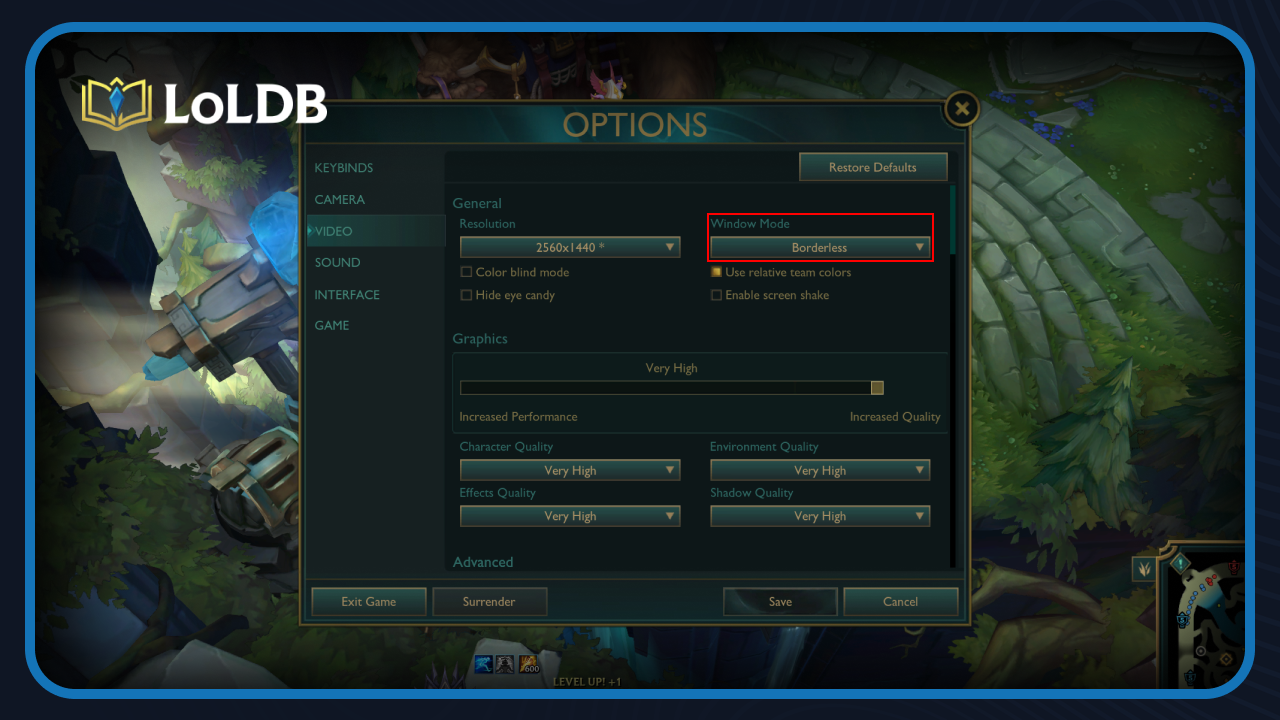
Getting League of Legends to run in full screen through the in-game settings is the simplest approach and the first thing you should try.
Launch League of Legends and get to the main client.
Start a game or head into the practice tool, as the video settings are only accessible in-game.
Once you're in, press Escape to open the settings menu.
Navigate to the Video tab.
Find the dropdown menu labeled "Window Mode" and select "Full Screen."
Hit Save in the bottom-right corner of the settings window.
The game will switch to full screen immediately. If the change doesn't apply correctly, try restarting the game entirely, as some systems require a full restart for the setting to take effect properly.
Also Read: How to Enable WASD Controls in League of Legends
Full Screen vs Borderless
Both modes will fill your entire screen, so visually, there isn't much of a difference. The difference comes down to performance and how you use your computer while playing.
Full screen gives the game exclusive control over your display, which generally results in better performance and slightly lower input lag. If you're focused purely on the game and don't need to switch between windows often, full screen is the better choice.
Borderless mode, on the other hand, keeps the game in a window that stretches across your entire screen without any borders. This makes alt-tabbing instant and smooth, which is useful if you're frequently checking a second monitor, a browser, or any other application while playing. The trade-off is that it can come with a minor performance hit compared to true full screen.
For most players, borderless mode is the more practical option since League of Legends isn't a particularly demanding game, and the performance difference is rarely noticeable. However, if you're on a lower-end PC and need every bit of performance you can get, stick with full screen.
Also Read: How to Fix Error Code 57 in League of Legends
How to Fix League of Legends Not Going Full Screen
If League of Legends isn't going full screen despite changing the setting, a few things could be causing it.
Your resolution doesn't match your monitor's native resolution. Head back into the Video tab and make sure the resolution set in-game matches your monitor's native resolution. A mismatch is one of the most common reasons full-screen doesn't apply correctly.
The game config file might be overriding your settings. Close the game completely and follow these steps:
Navigate to League of Legends folder (e.g. D:\Riot Games\League of Legends\Config)
Open the game.cfg file.
Look for the line that says "WindowMode" and make sure its value is set to 0.
Save the file and relaunch the game.
A second monitor could be interfering. If you're running a dual monitor setup, try disconnecting the second monitor temporarily and launching the game again.
Your GPU scaling settings might be the issue. Open your graphics card's control panel, whether that's NVIDIA Control Panel or AMD Radeon Software, and make sure scaling is set to full screen from there as well.
If none of these work, try repairing the game through the Riot client. Go to settings, select League of Legends from the left side, scroll down, and select "Repair." This will scan and fix any corrupted files that might be causing the problem.
Final Words
Setting League of Legends to full screen is straightforward once you know where to look. Whether you go with full screen or borderless mode, both will give you a clean, distraction-free experience. If anything goes wrong along the way, the fixes in this article should cover most of the issues you'll run into.
Want to explore more? LoLDB has everything League of Legends. Browse champions, skins, mythic shop rotation, current sales, and much more!
When is the Next Your Shop in League of Legends? (2026)
Your Shop is a periodic sale event in League of Legends that offers up to six discounted skins specifically tailored to your account. The system analyzes your...
All Star Guardian Skins in League of Legends
Since 2015, League of Legends has been releasing Star Guardian skins that turn champions into magical girls and boys, complete with colorful outfits, sparkling...