


League of Legends offers a huge collection of purchasable content, including champions, skins, emotes, chromas, and other cosmetic items. Players often spend money or in-game currency on these items to show off their favourite champions.
The refund system has clear eligibility requirements that determine which items can be returned and within what time frame. Not everything qualifies for a refund, and Riot Games limits the number of refunds available to prevent system abuse while still giving players flexibility with their purchases.
In this article, we'll explore how to refund skins and other items in League of Legends, the eligibility requirements you need to meet, and the limitations of the refund system.
How the Refund System Works
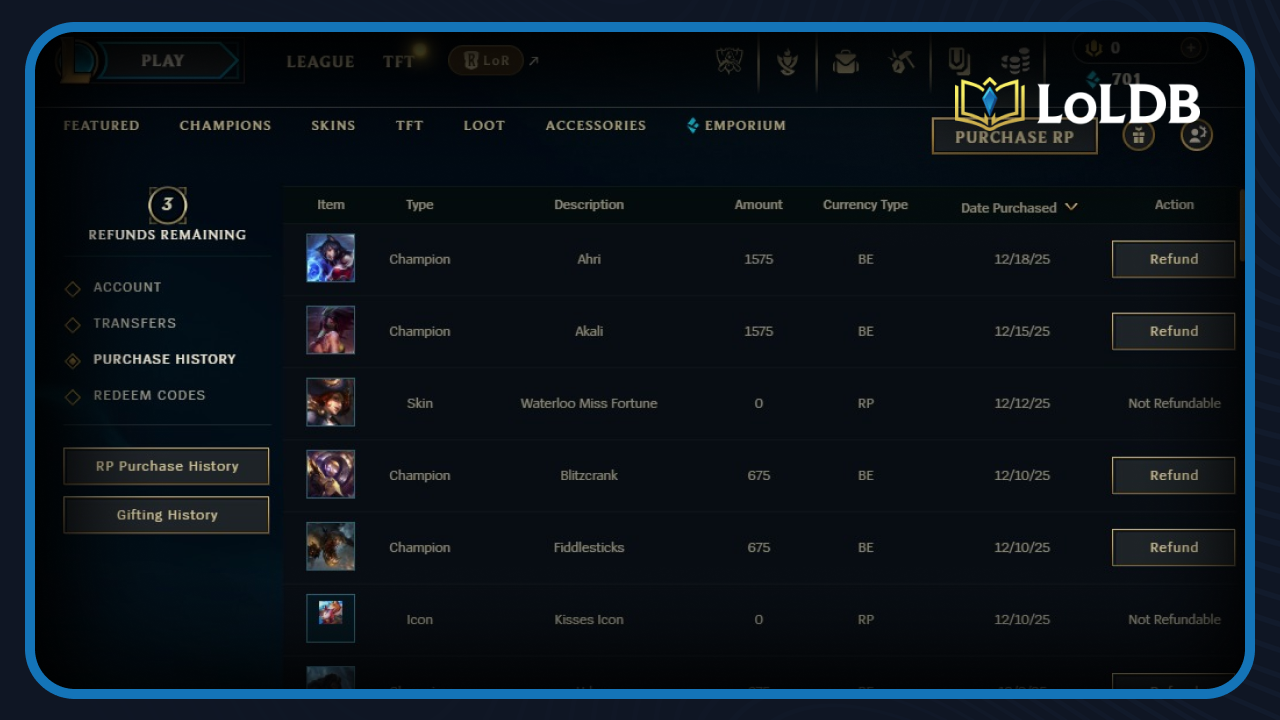
Refunding skins and items in League of Legends follows a straightforward process, but comes with strict limitations that you need to understand before making any purchase decisions. Riot Games provides each account with three refund tokens to start. Once you use a token, you earn one additional token per year, usually around the start of the new season, up to a maximum of three tokens.
To refund an item or skin, you need to meet specific conditions:
Unused content: Eligible items can be refunded 14–90 days after purchase
Used content: Eligible items can be refunded within 90 days of purchase, even if you've used them
Refunds return the same amount and currency you paid. If you bought a champion on sale for RP, you'll get the sale price back in RP—not the regular price
How to Refund Skins
The refund process is simple once you meet the requirements:
Open the League of Legends client and click on the store icon.
Navigate to the account section where you'll find the purchase history.
Select the item you want to refund.
If it meets all eligibility criteria, use one of your refund tokens to get your RP or Blue Essence back immediately.
What You Can Refund (and What You Can't)
League of Legends allows refunds for specific item types, but many purchases fall outside the refund system. Understanding what qualifies for a refund before making a purchase will save you from wasting your limited refund tokens.
You Can Refund | You Cannot Refund |
|---|---|
Champions | Account transfers |
Emotes | Boosts |
Individual Chromas | Bundles |
Skins | Chests |
Ward skins | Earned content |
Chroma packs | Event passes |
Rune pages | Promotional items |
Summoner icons | Gifts (sent or received) |
Riot ID changes (if your previous name hasn't been taken) | Hextech inventory (such as keys, chests, and shards) |
Unused Ancient Sparks |
Some items on the refundable list cannot be refunded directly by the client. If you need to refund chroma packs, rune pages, summoner icons, or Riot ID changes, contact Riot Games support and submit a ticket for assistance.
Other Methods
In special circumstances where the automated refund system doesn't work or you've run out of tokens due to unusual situations:
Contact Riot Games support directly and submit a ticket explaining your situation.
The support team will review your request and handle cases individually.
They may approve refunds outside the normal system for legitimate reasons like accidental purchases or technical issues.
Conclusion
League of Legends' refund system gives players a safety net for unwanted purchases, but the limited token system means you should use refunds carefully. With only three tokens available at any time and just one token refreshing per year, it's important to think twice before making cosmetic purchases.
Want to explore more? LoLDB has everything League of Legends. Browse champions, skins, mythic shop rotation, current sales, and much more!
How to Get Blue Essence: Complete Guide
League of Legends has been one of the most popular games since 2009, featuring over 170 champions that players can unlock and master. Blue Essence is the primary...
All League of Legends Halloween Skins (2026)
Halloween is one of the most anticipated times of the year in League of Legends. Riot Games has built a reputation for creating spine-chilling and creative skins,...